 Escribal
Example
Monthly close
From three CSV files to a workbook, a board deck, a one-page PDF and a report, all with the same look. About 800 instructions.
The pack a finance team puts together every month, written by one workflow. It reads the sales, the expenses and the budget from three CSV files and writes four documents with the same look and the same figures: a workbook, a board deck, a one-page PDF summary and a report. It is about 800 instructions, and the notes on the canvas explain it from the inside.
Download Escribal-monthly-close.zip
The download holds the workflow, the made-up data it reads and a short set of instructions. The four documents come out when you run it. The company (Norvale Group) and its figures are made up.
You can run it yourself, or hand it to your AI agent and ask for changes in your own words: a color, a threshold, one more slide (how, below).
To start with something small, the monthly account statement example is 29 instructions and can be read in one sitting.
What comes out
The board deck, ten slides. The five figures of the month go on cards, each with a strip in green or red that says which side of the budget it landed on.
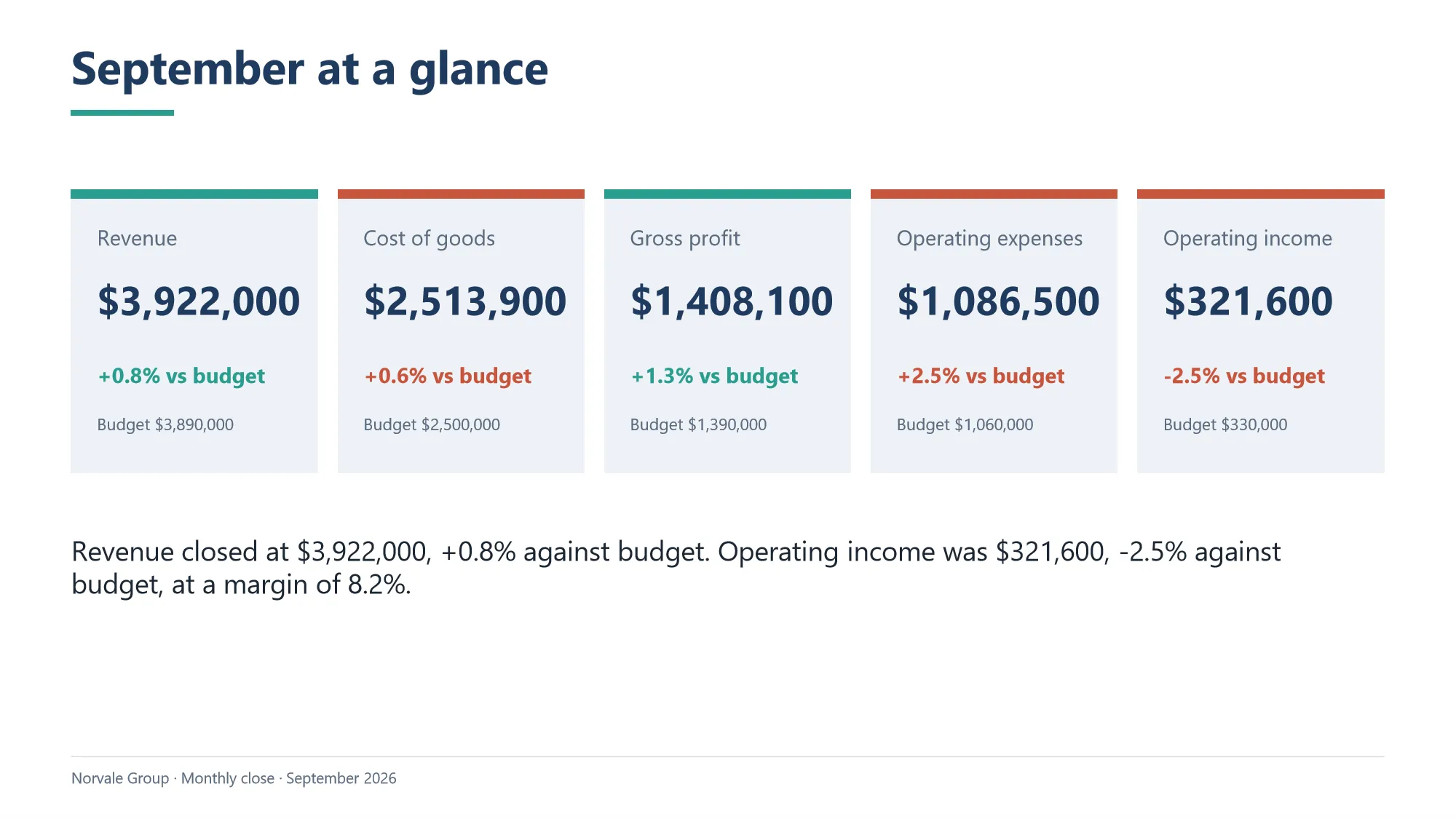
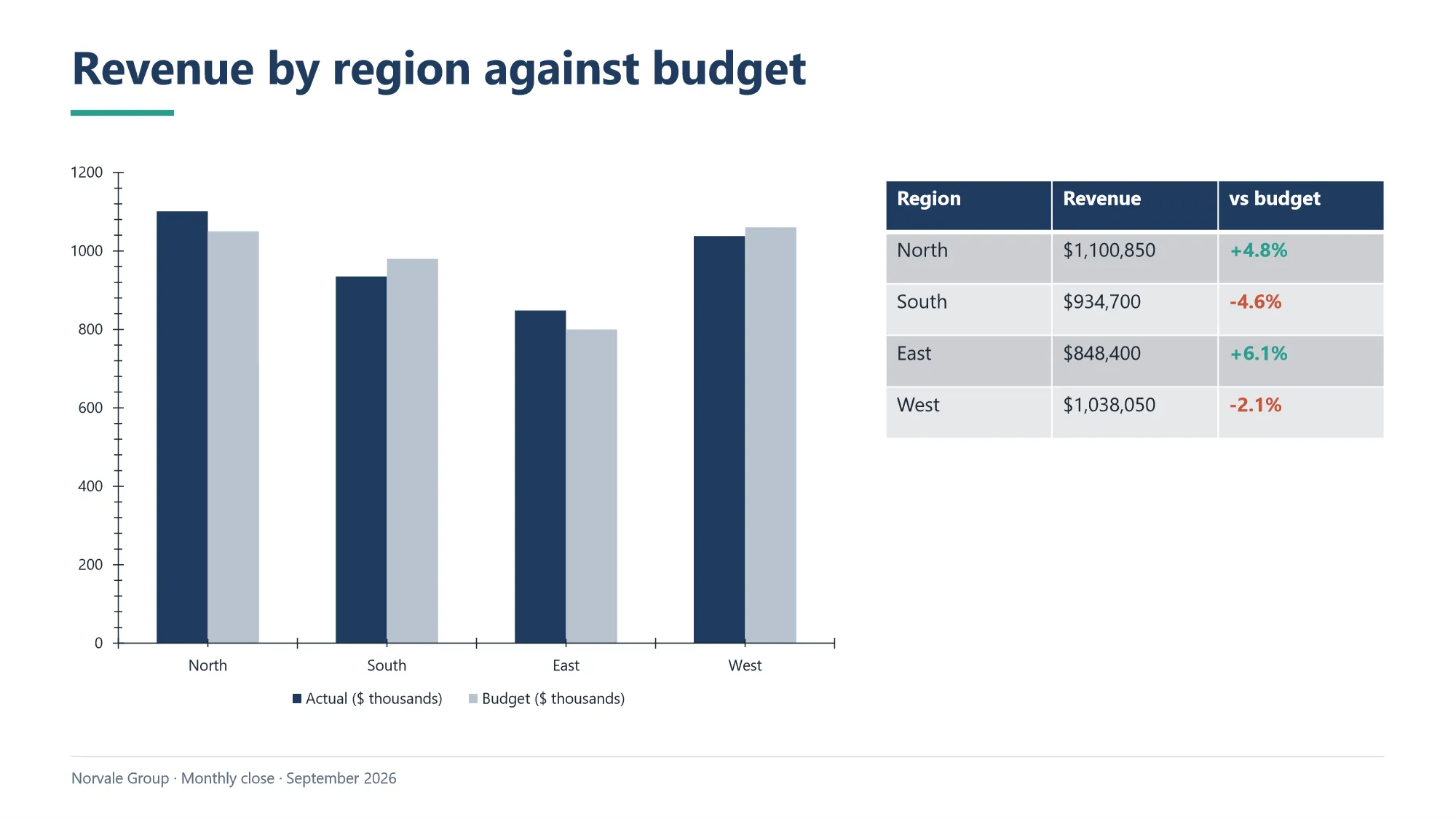
Charts and tables take the brand colors from the theme, and the lists a chart needs are built in the same loop that fills the table beside it.
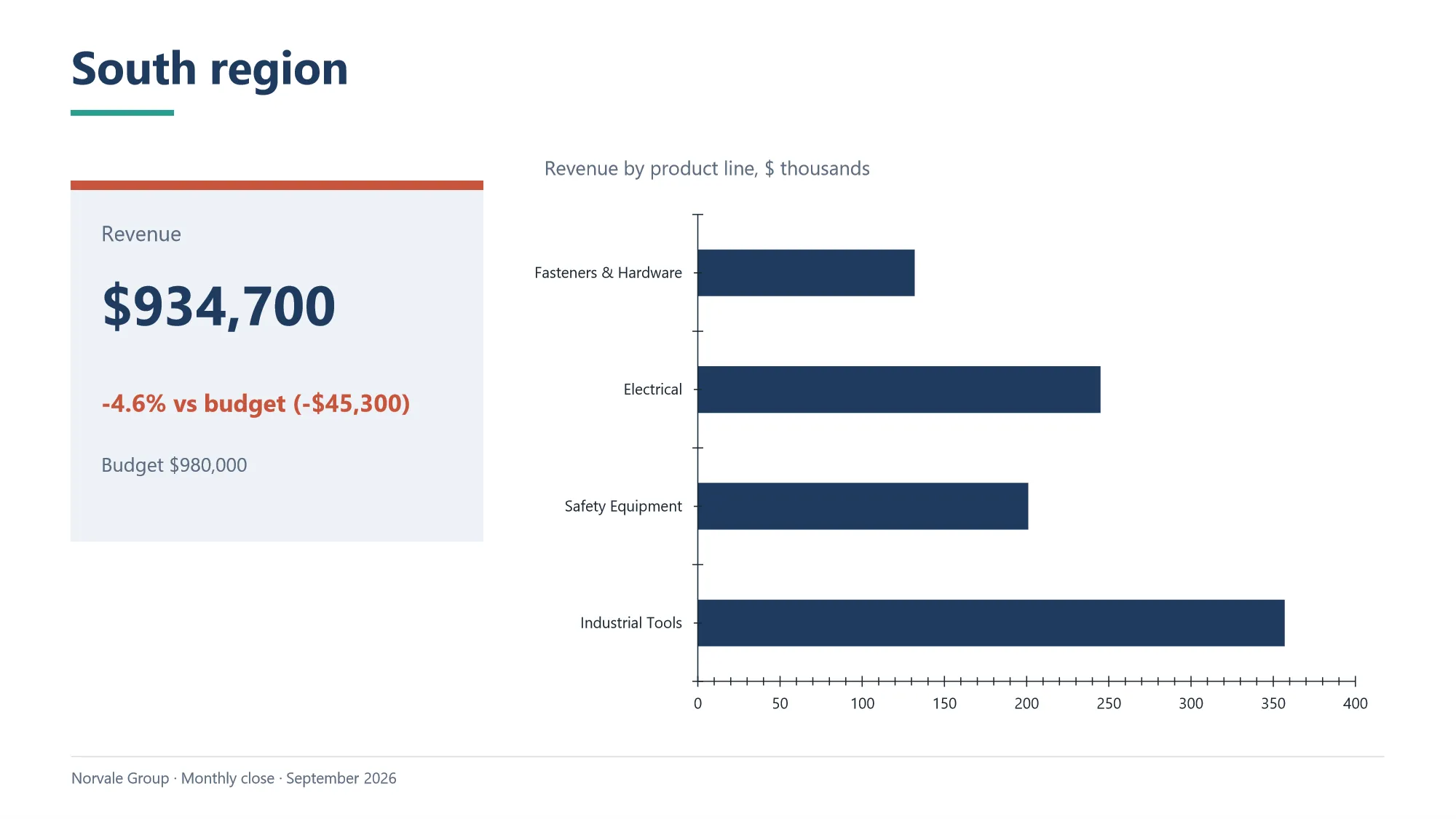
There is one slide per region, and nobody wrote them one by one: a loop makes a slide for every region it finds in the data.
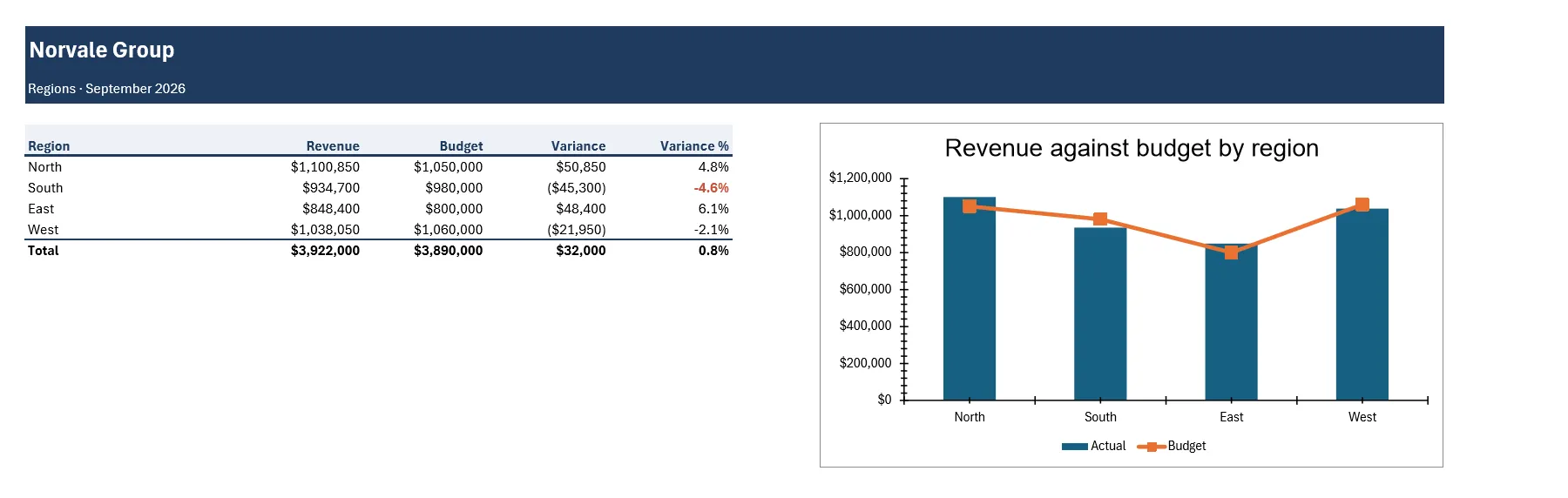
The workbook, five sheets with the same header. The variances and the totals are live formulas, the rows past the alert threshold are picked out, and each sheet prints on one page.
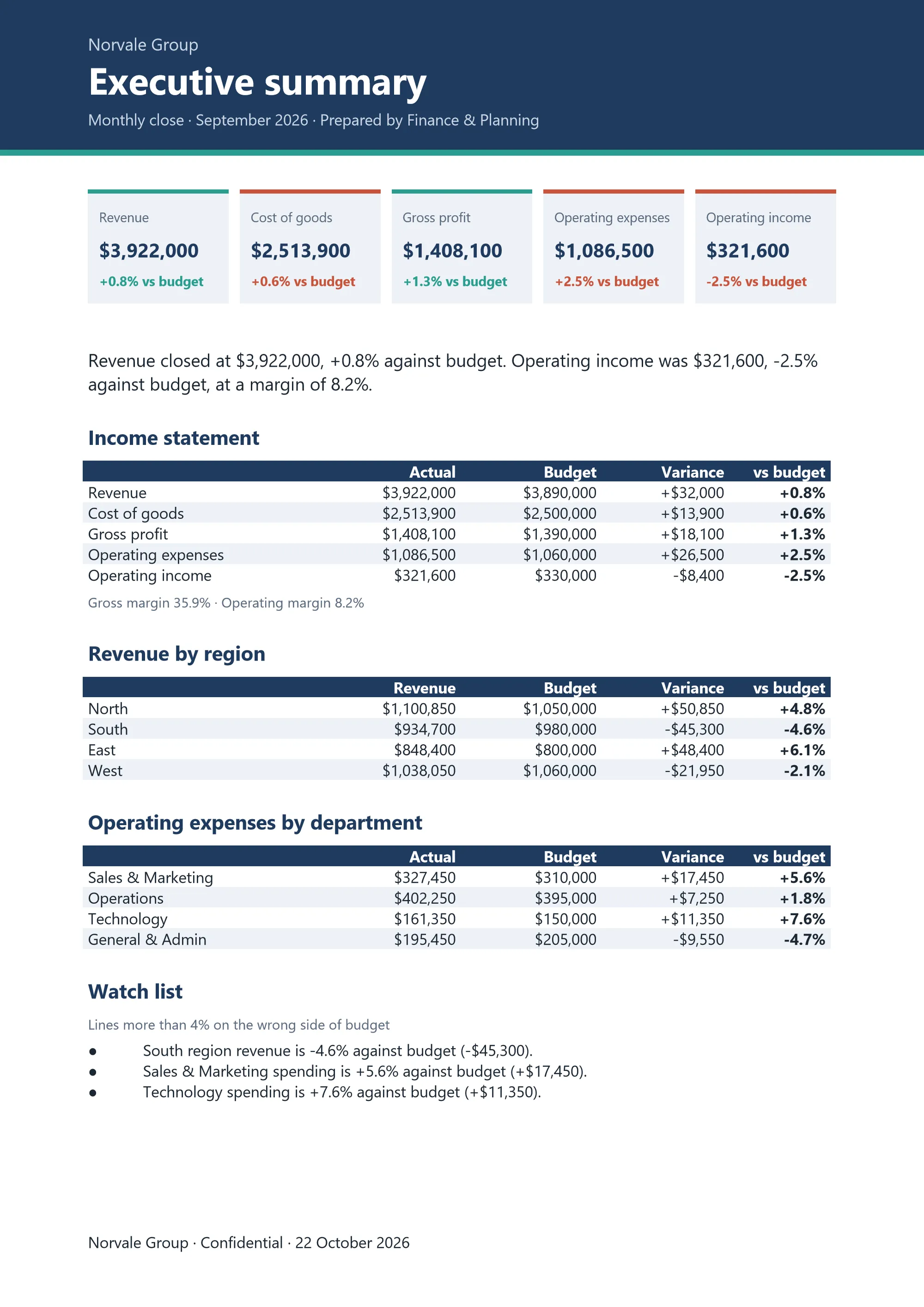
The PDF summary, one page to send by e-mail. The band and the tiles at the top are drawn at exact positions; the tables and the watch list flow under them.
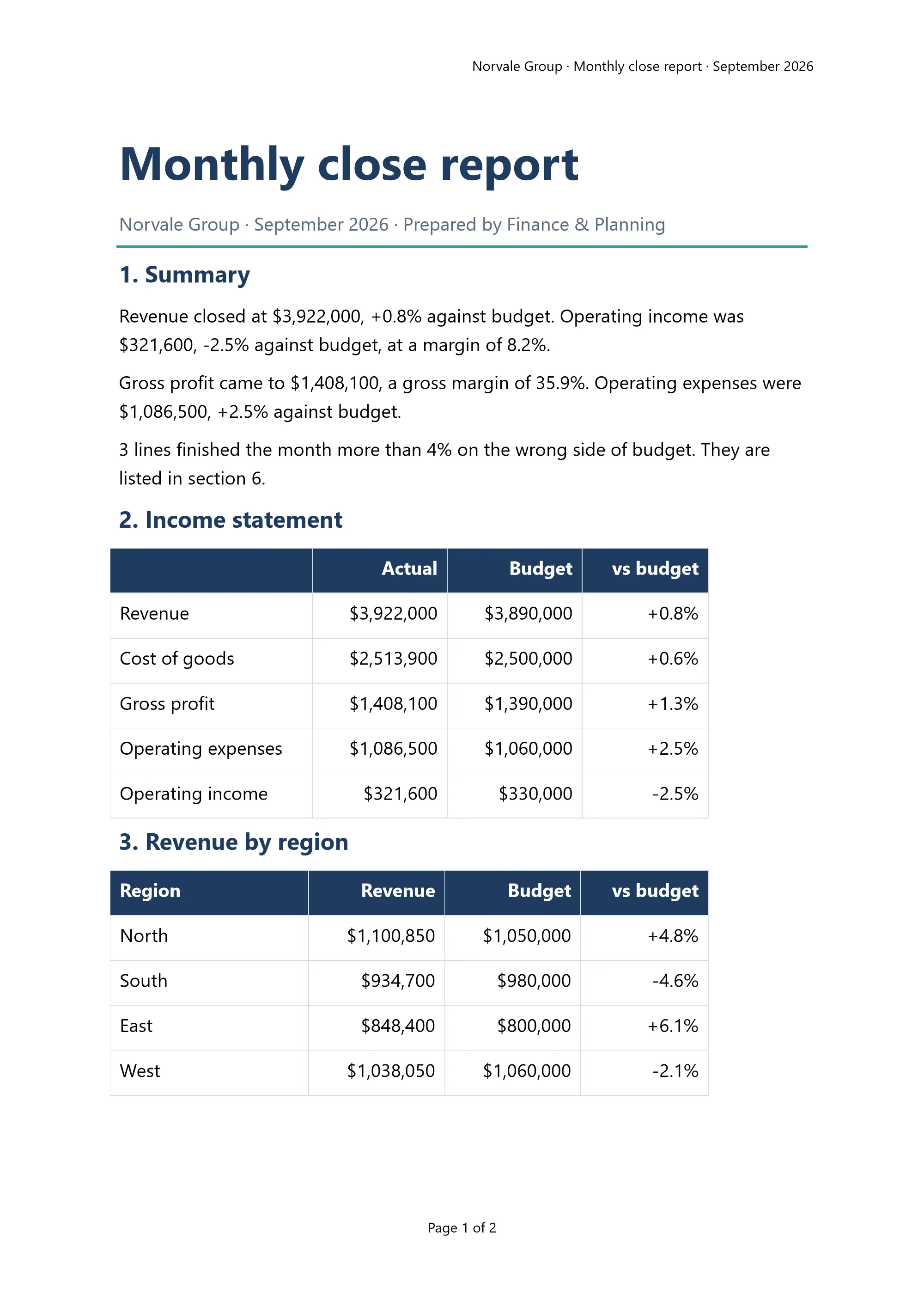
The report, two pages with a header and Page 1 of 2 in the footer. The sentences of the summary are written from the figures, so the text is never out of step with the tables.
How to use it
- Unzip into Documents, so that you end up with the folder
Documents\Escribal-monthly-closeholdingMonthly-close.scribaand the three CSV files. The name matters: it is the folder the workflow names. - Open
Monthly-close.scribain Escribal and press Run. - Four documents appear beside them:
Management-report-September.xlsx,Board-deck-September.pptx,Executive-summary-September.pdfandManagement-report-September.docx.
If the folder ended up somewhere else, the run stops without writing anything and tells you exactly where it looked.
Make it yours
Everything you would change is at the top of the canvas, under three notes:
- Settings: the company, the month, the year, who prepares the pack and the alert threshold.
- Settings, the color palette: the five brand colors and the two text colors.
- Settings, the font: one font for the deck, the PDF summary and the report.
Change a color and run again: all four documents follow. Change the threshold (4 by default, a percentage) and the watch list changes with it: it holds every region that fell short of its budget and every department that went over it by more than that.
To run it next month, replace the three CSV files with the new ones, with the same file names, change the month in the settings and press Run. The documents come out named after the month.
Or ask your AI agent
Everything above can also be asked for in your own words. Connect your AI agent once (it takes a
minute: Escribal gives you the configuration already filled in, see
connecting your AI agent) and ask it to work on Monthly-close.scriba with Escribal.
Some things to try:
- “Change the main brand color to dark blue and run it again.”
- “Add a slide to the deck with the expenses by category.”
- “Set the alert threshold to 6 and tell me what is left on the watch list.”
- “Explain what the part of the canvas that makes one slide per region does.”
The agent opens the workflow, changes it, checks it before running it, runs it, and tells you which
files it wrote and what it warned about. What it leaves is still a workflow: open
Monthly-close.scriba on the canvas and read what it changed, instruction by instruction. Next
month it runs without the agent.
And to see how a failure is told, break something on purpose: rename one of the CSV files and run it again. Nothing is written, and the instruction at fault is marked in red with its explanation.
What the canvas does, top to bottom
- The settings and the data. The three CSV files are read, grouped by region, by product line and by department, and each set against its budget. Two lists come out of this that all four documents use: the income statement in five lines and the watch list.
- The workbook. The look is set once, by a loop over the sheet names; then each sheet is filled, with its formulas, its chart and the rows past the threshold picked out.
- The board deck. One slide is a template (title, rule and footer) and the others are copies of it. The cards and the slide for each region are made by loops.
- The PDF summary. The band and the tiles are drawn by coordinates; the rest flows down the page.
- The report. Four styles, the tables filled by loops and, at the end, one font and one spacing for the whole document.
What is in the download
| File | What it is |
|---|---|
Monthly-close.scriba |
The workflow. This is what you open in Escribal. |
sales.csv |
Made-up sales: revenue, cost and units by region and product line. |
expenses.csv |
Made-up expenses: what each department spent, by category. |
budget.csv |
The budget for the month: the regions, the cost of goods and the departments. |
README.md |
These same instructions. |
LICENSE.txt |
The MIT license: use the example as a template and change it however you like. |
The paths inside the workflow are portable: there is no folder from the machine it was built on, so it works on yours without changing anything.