 Escribal
AI agent
Or your AI agent builds it for you
Describe what you need in your own words, and your AI agent looks up the available instructions, writes the workflow, validates it, runs it and fixes it until the documents come out right.
Escribal includes an MCP server, the standard AI agents use to work with outside programs. It works with any MCP-compatible AI agent, and connecting it takes a minute.
What you are left with is not a black box
- You review and reuse the result. It is a
.scribafile you open in Escribal, read instruction by instruction, and run again without needing the AI. - It is reproducible. The AI does not generate a different document every time: it assembles the instructions that produce the same one every time.
- Your passwords do not pass through the AI. A workflow that queries a database is run from Escribal, which is what asks for the password.
Connecting it
The application gives you the configuration already filled in, with the real path of the program on your computer: open Assistant in the top bar and copy what it shows you. Escribal writes no configuration file, because where that configuration lives changes with every agent.
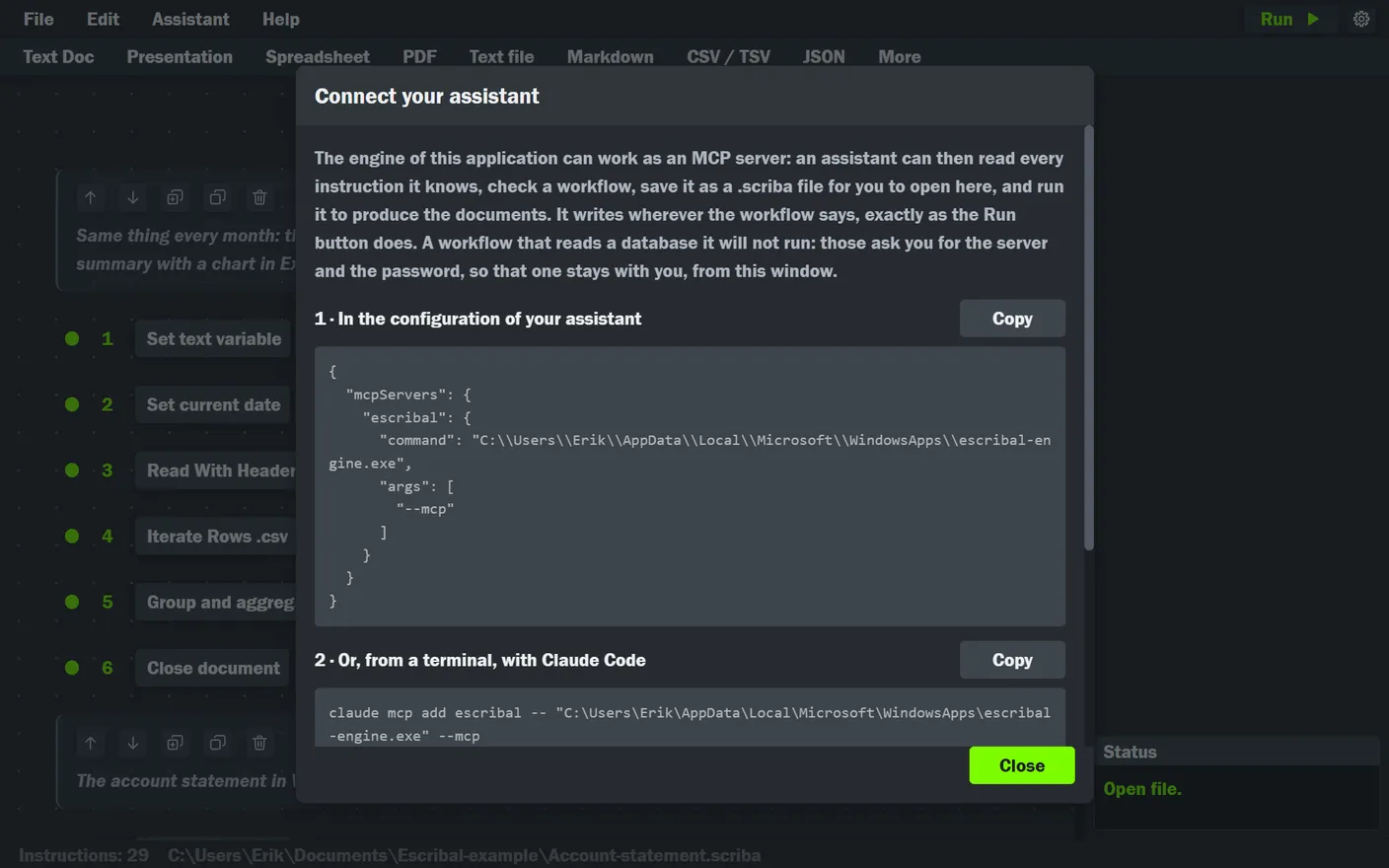
What you copy looks like this:
{
  "mcpServers": {
    "escribal": {
      "command": "<the path of the program, which the window fills in for you>",
      "args": ["--mcp"]
    }
  }
}
And for Claude Code, the equivalent command:
claude mcp add escribal -- "<the path of the program>" --mcpName Escribal in what you ask for
Connecting the server is not enough. An agent given a document job reaches for its habits (a script and a couple of libraries) before it looks at the tools it has, so what settles it is naming it. This line is meant to be pasted into your agent's instructions:
Use the Escribal document generator I have connected (the `escribal` MCP server) to produce documents, presentations, spreadsheets, PDF, Markdown, JSON, CSV and text files. No scripts and no libraries to install.What your agent can do
| Tool | What it does |
|---|---|
describe_workflow_format | Explains what a workflow is and how it is written. It is the first thing it reads. |
list_instructions | The list of what Escribal can do, by format and by group. |
describe_instructions | The detail of one or several: every field, its default value and its help card. |
validate_workflow | Checks a workflow without running it and says what it finds. |
save_workflow | Saves it as a .scriba, which is the file you open in Escribal. |
run_workflow | Runs a saved .scriba and reports which files it wrote and what it warned about. |
open_workflow | Reads an existing .scriba, to look at it or change it. |
Two things your agent cannot do
- Run a workflow that queries a database. You run that one yourself from the application, which is what asks for the password. That way the server, the database and the password never enter the conversation with the AI.
- Run something that has not been checked. A workflow with errors is not run; and the error that destroys other people's data (opening a file without saying where to save the result, which would save over the original) is exactly one of those the check stops.
Otherwise it writes wherever the workflow says, just as when you press Run yourself.
If you want to see it before asking for anything
The monthly close example is a real workflow, with its data: four documents from three CSV files. It works as a starting point to show your agent, and the monthly account statement example is a shorter one.